Blog · TickMate · Terminal · Portfolio · Getting Started
Your exchange isn't on our list? Import your holdings and ask TickMate for a review
TickHint Dev Team · · 4 min read
TickHint connects to cTrader, Alpaca, Revolut X and Kraken. If your coins sit somewhere else, you can still use the tools: upload a CSV of what you hold, and your TickHint account starts from there. Then ask TickMate to review the portfolio, check the news on it, or set an agent to watch it.
Short answer: yes, you can use TickHint on crypto you hold somewhere we don't connect to. Upload a CSV with one row per coin, and your TickHint account, the paper trading account every user gets, starts from those holdings. From then on TickMate can review them, pull the news on them and watch them for you.
TickHint connects directly to cTrader, Alpaca, Revolut X and Kraken. That list is short, and most crypto is held elsewhere. Until now, if your exchange wasn't on it, the assistant had nothing of yours to look at.
Step 1: write down what you hold
The file has three columns and one row per coin:
symbol,quantity,average_price
BTC/USD,0.35,52400
ETH/USD,4.2,1790
SOL/USD,85,61.20
- symbol: the coin as a pair against the US dollar, like
BTC/USD. - quantity: how much you hold.
- average_price: what you paid per coin, on average, in US dollars.
Use a dot for decimals and no thousands separators. A file can hold up to 200 coins. Most exchanges export something close to this; you can also type it in a spreadsheet and save it as CSV. There is a template to download in the next step.
Step 2: import it
- In the Terminal, type
/accounts. This opens your accounts card without using the AI, so it costs no credits. - Open Edit on the TickHint account and scroll to Import holdings.
- Choose your file, and set the cash you want the account to start with.
- Press Check the file. Nothing changes yet. You get a preview: each coin, the quantity and price it read, and what it is worth now, with a total.
- If a row can't be read, the preview says which one. Nothing is imported until the whole file is clean.
- Press Replace this account… and confirm.
Importing replaces what the account held before, as a reset does. It asks you to confirm for that reason.
Step 3: ask for a review
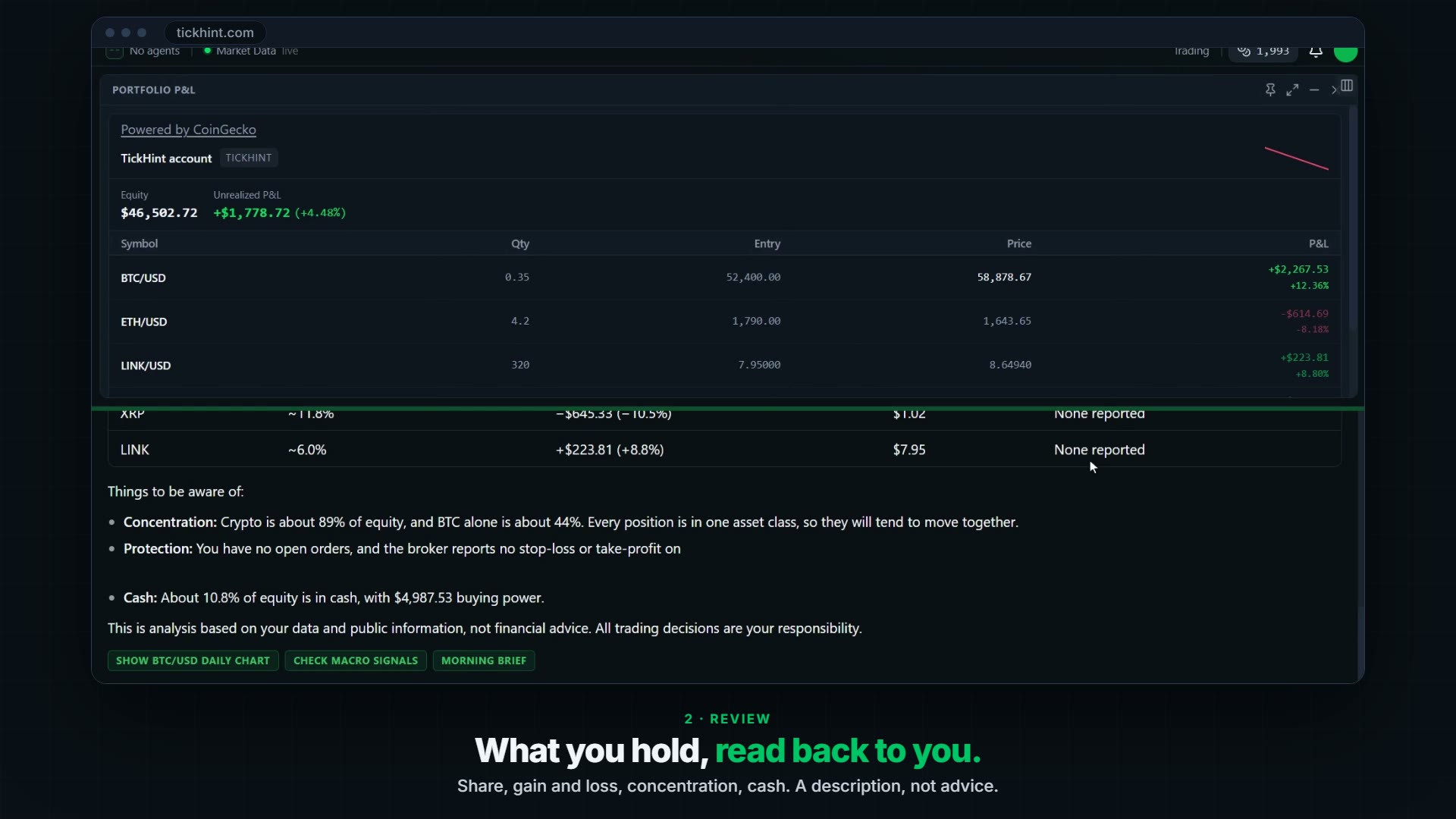
Type "Review my portfolio", or tap it on an empty Terminal. TickMate opens your positions on the canvas, priced at the current market, and writes a review. In our test with five coins it covered:
- The whole picture: total value, how much is in positions and how much in cash.
- Each position: its value, its share of the portfolio, and where it stands against your average price.
- Concentration: which holding dominates, and how much the holdings tend to move together.
- Protection: whether anything has a stop loss or take profit, and whether any orders are open.
- Cash: how much of the account is uninvested.
It ends by offering the next step, and you can take it in a tap: the news on your holdings, a chart, the sentiment on one coin.
A review uses AI credits, like any answer. Opening cards with slash commands doesn't.
What else you can do with it
Once your holdings are in, they are simply an account, and everything that works on an account works on them:
- "What's the news on my holdings?"
- "Open SOL/USD on the 1-hour chart."
- "Watch my holdings and message me on Telegram when one of them moves a lot." That sets up an agent. Free accounts get one.
- An agent can suggest a trade. If you accept it, the trade fills on the TickHint account at the current price. If you then place it for real at your exchange, Edit fill prices lets you correct the price to what you actually got, so the account keeps matching reality.
What to know before you rely on it
- It is a copy, not a connection. TickHint can't see your exchange. When you trade there, the TickHint account doesn't know until you tell it: trade on the TickHint account too, or import a new file.
- Crypto only, priced in US dollars. A coin we have no price for is kept at its cost until a price arrives; the preview tells you which.
- Nothing here moves real money. Orders on the TickHint account are paper orders. Your coins stay where they are.
- A review is a description, not advice. It tells you what your portfolio looks like. What to do about it is your call.
Try it
Sign up free, type /accounts, and import your holdings. Then ask TickMate what it sees.
Trading involves risk. TickHint does not provide investment advice.