Blog · Terminal · TickMate · Getting Started · Product
Start with a question: TickHint now sets itself up as you go
TickHint Dev Team · · 5 min read
Sign up and ask. A new TickHint account opens in the Terminal with six first prompts, and setup arrives as a card in the conversation only when you need it: your broker when you want to trade, Telegram when your first agent starts. No AI key, ever.
Short answer: a new TickHint account now opens straight into the Terminal, with one prompt and six first questions to pick from. There is nothing to set up before your first answer. When you want something that needs setup, like trading on your own account, TickMate puts the setup card right in the conversation.
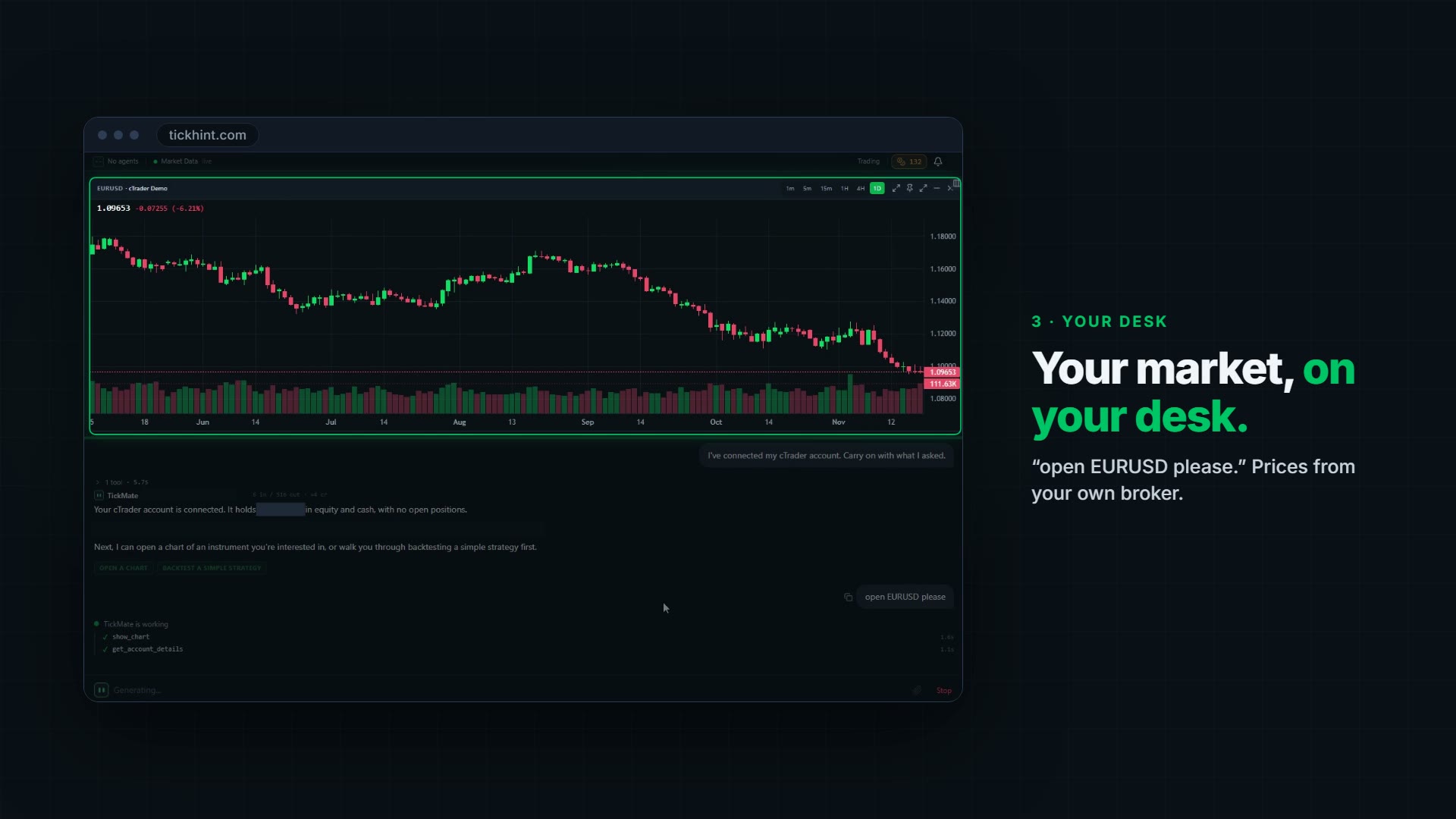
The video above is a new account from the first screen to a live chart: a tap on a first prompt, the broker card arriving in the conversation, a cTrader demo account connecting, and EURUSD from that account landing on the canvas.
We changed this because of what we watched happen. Every person who tried TickHint before got stuck in the same places: a page of settings before anything useful, then too many screens to choose from. One of them asked us for fewer features, not more.
So the order is reversed. You ask first. Setup comes when it's needed, and not before.
Six first prompts, one for each kind of trader
An empty conversation offers six starting points. Every one of them works on a new free account, with no broker connected and no AI key, at any hour: BTC/USD is on our platform feed around the clock.
| Tap this | What happens |
|---|---|
| How can I start trading? | TickMate lays out a simple path in a few steps, then asks where you'd like to begin: connect your broker, or test an idea first. |
| How is BTC/USD doing these days? | A plain read of the market, with the chart on your canvas. |
| Bring up BTC/USD 5m and 15m side by side | Two live charts on the canvas, ready to compare. (On a wide screen: the canvas needs the room.) |
| Review my portfolio | Your positions and what moved them, once a broker is connected. Before that, TickMate tells you what it needs. |
| Watch BTC and message me when it moves a lot | Your first agent. More on that below. |
| Test a simple strategy on BTC/USD | A strategy written from your description and backtested, in Strategy Studio. |
You don't have to use them. Type anything; they're there so the first screen is never a blank box.
Setup comes to you, as a card
Setup still happens. It just waits until it's needed, and then it shows up as a card in the conversation, where you already are.
- Your broker. The first time you want to trade, or ask about something our platform feeds don't cover (any FX pair, for example), TickMate shows the broker connection card. Connect cTrader, Alpaca, Revolut X or Kraken from there, and pick the account you want. Then ask for a market ("open EURUSD please") and the chart lands on your canvas with prices from your own broker.
- Telegram. When your first agent starts and needs a way to reach you, the Telegram card appears so the agent can message your phone.
- Credits. If your monthly AI credits run out, a card says so plainly and shows what you can do about it.
What you never need is an AI key. Every account runs on our key, and the free plan includes 250 AI credits a month. If you'd rather bring your own key, you still can.
Your first agent, from one sentence, on the free plan
Agents are what TickHint is for: something that keeps an eye on the market while you get on with your day. Until now they were a Pro feature. Free accounts now get one.
Setting it up is a conversation:
- Type "Watch BTC and message me when it moves a lot".
- TickMate sets up the agent and agrees how often it checks: hourly or slower on the free plan.
- If Telegram isn't linked yet, the Telegram card appears right there. Link it once.
- When the agent has something to say, it messages your phone. Ask "What did my agent do?" any time to see its runs.
An agent can suggest a trade. It can't place one. A suggestion arrives with Approve and Dismiss, and nothing happens until you choose.
The agent's runs use your monthly credits. Pro gives you more agents, faster schedules and more credits.
Cards without the AI, and a strip with a Stop button
The screens you used to open from a menu are now cards. Ask for one in words, or type its slash command to open it directly. Slash commands skip the AI, so they cost no credits.
| Command | Opens |
|---|---|
| /connect | Connect a broker |
| /accounts | Your broker accounts: rename, replace keys, remove |
| /order | An order ticket for your own trade |
| /telegram | Link Telegram |
| /runs | What your agents did |
| /credits | Your AI credits |
| /theses | Your theses |
| /strategies | Your strategies |
| /live | Strategies running live, with the way to stop them |
| /editor | The Strategy Editor |
Across the top, a thin strip replaces the old app header. It shows your agents with their missions, your live strategies, market data, credits and notifications. Every running agent and live strategy has a one-tap Stop there, so the off switch is never more than a tap away.
On a phone browser the Terminal works too. There's no canvas on a small screen, so panels arrive as cards in the conversation.
What hasn't changed
- You approve every trade. Any order TickMate prepares goes on an approval card with the account, size and cost. The order ticket card is for your own orders.
- Your money stays at your broker. TickHint connects to the account you already have; it never holds funds.
- Existing accounts keep their pages. If you signed up before this release, your menu is still there (it's called Pro mode now), and you can switch it off in the account menu to try the Terminal-first layout. Intelligence, Subscription and the Strategy Editor stay full pages for everyone.
- The Terminal you knew is still the Terminal. The canvas, live charts and briefs from Meet the Terminal all work as before. What changed is that it's now where you start.
Try it
Sign up free, no card and no AI key, and ask your first question. When you want to trade, the broker card will be there.