Blog · TickMate · Terminal · Getting Started · Product
Paper trade with TickMate before you connect a broker
TickHint Dev Team · · 5 min read
Every TickHint account now comes with a paper trading account: $10,000 in paper money, crypto at current prices, and the same approval card as a real trade. Ask TickMate for a trade in your first minute, set the balance and fees to match your own broker, and connect that broker when you are ready.
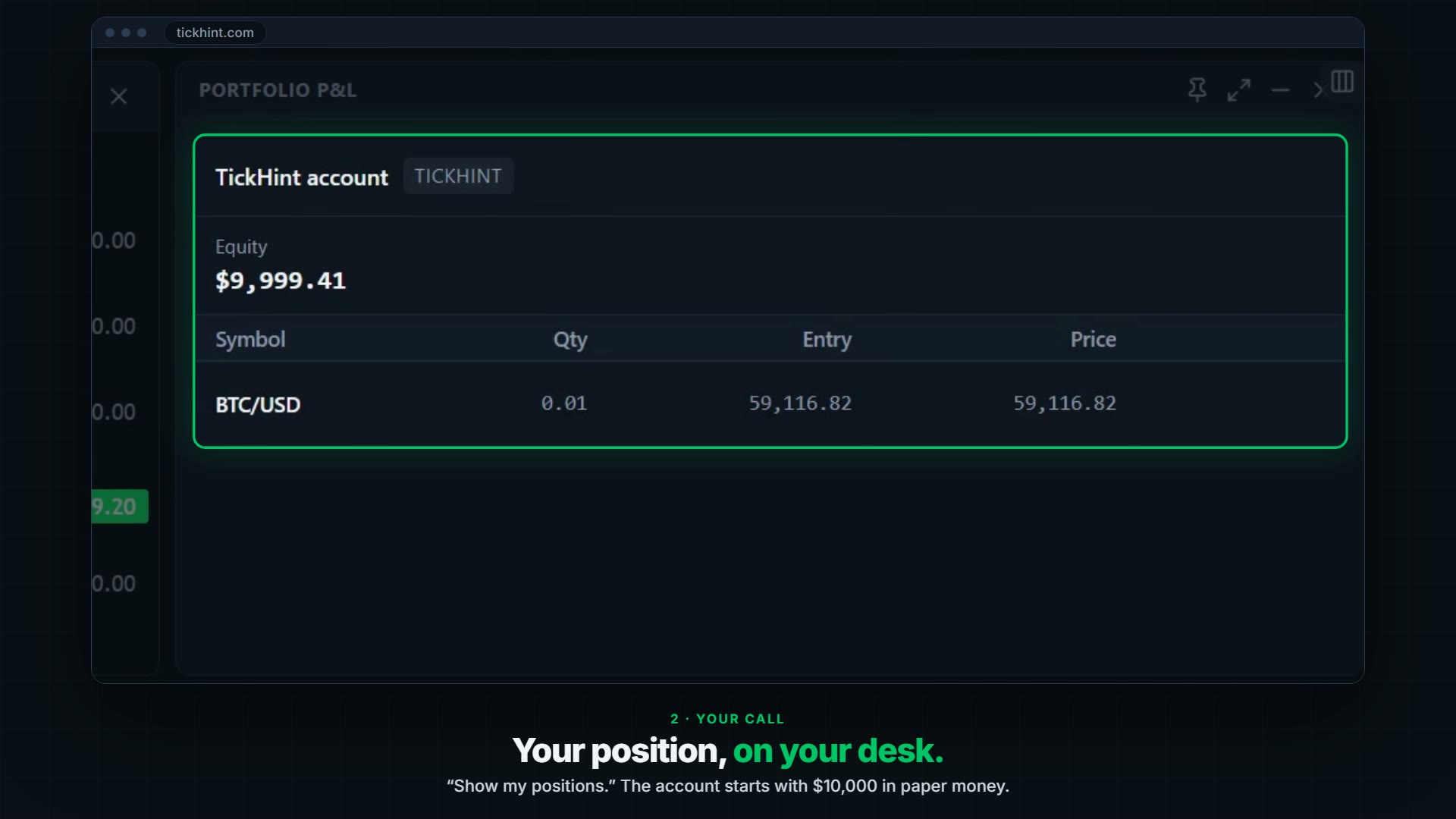
Short answer: every TickHint account now comes with a paper trading account, called your TickHint account. It starts with $10,000 in paper money and trades crypto at current market prices. You can ask TickMate for a trade in your first minute, with no broker connected, and it goes through the same approval card as a real one.
The video above is a new account doing exactly that: a question about Bitcoin, a chart on the canvas, an order that waits for approval, the position on the desk, and the account set up to look like the trader's own broker.
Why we added it
In the last release we moved setup out of the way: you ask first, and the broker card comes to you when you want to trade. That left one gap. The most interesting things TickHint does, an order that waits for your approval, an agent that suggests a trade on Telegram, a position you can ask questions about, all needed a broker account first.
Now they don't. The paper account is there from sign-up, so you can see how all of it works before any real account is involved.
Your first paper trade
- Ask about a market. "How is BTC/USD doing these days?" puts the chart on your canvas with a plain read of recent price action.
- Ask for a trade. "Buy 0.01 BTC". TickMate prepares a market order on your TickHint account.
- Approve it. The order sits on an approval card with the account, the size, the last price, the estimated cost and your buying power. Nothing happens until you approve.
- Watch it. "Show my positions" opens the position on your canvas, marked to the current price.
Give the size in coins. TickMate may ask you to confirm the quantity when you give it a dollar amount.
It behaves like an account, because it is built as one
Inside TickHint, the paper account is one more broker connection. Everything that works on a connected broker works on it the same way:
- TickMate's orders go on an approval card, every time.
- Your own orders from the order ticket (
/order). - Agent suggestions. An agent watching the market can suggest a trade on Telegram. Accept, and it fills on your TickHint account.
- Positions, closed trades and history, in the Terminal and on Telegram.
What it does not do is move real money. Fills are simple and predictable: a market order fills at the current platform price, less a commission. It is a place to learn how TickHint works and to try ideas. It is not a prediction of how a real venue would fill you.
Set it up like your broker
Type /accounts and open Edit on the TickHint account. Slash commands skip the AI, so this costs no credits.
| Setting | What it does |
|---|---|
| Cash balance | Set it to what you actually trade with. Your positions stay as they are. |
| Taker fee % | The percent charged on orders that fill right away. It starts at 0.1%. |
| Fixed and minimum fee | For brokers that charge a flat amount per order, or never less than a minimum. |
| Slippage % | Optional. Buys fill this much above the price, sells this much below. |
| Import holdings | Upload a CSV of what you hold at your broker (symbol, quantity, average price), and the account starts from there. |
| Reset | Clears positions and history and starts again with the balance you choose. |
You can also correct a fill. If you took an agent's suggestion and placed the trade by hand somewhere else, Edit fill prices lets you change the price to what you really got, on the web or right after Accept on Telegram. For traders whose broker TickHint doesn't connect to yet, that makes the paper account a running record of trades placed by hand.
What it is not, yet
We'd rather say this plainly than have you find out:
- Crypto only. Stocks and forex need your own broker for now.
- Market orders only, and long only. You buy and sell coins you hold. Limit and stop orders, stop loss and take profit are built and will be switched on later.
- US dollars only.
- No live strategies. Strategy Studio strategies are written and backtested for free, and run live on your own broker account, not on the paper account.
- Private. Paper results never count on leaderboards or public track records. You can edit them, so they shouldn't.
When you connect your broker
Connect cTrader, Alpaca, Revolut X or Kraken whenever you like, from the same card (/connect). TickHint asks whether the new account should become your default for that market. Nothing switches without you, and the paper account stays, so you can keep trying ideas there before they touch real money.
What hasn't changed
- You approve every trade, paper or real.
- Your money stays at your broker. TickHint never holds funds. The paper account holds paper money only.
- No AI key needed. Every account runs on our key; the free plan includes 250 AI credits a month.
Try it
Sign up free, no card and no broker, and ask TickMate for your first paper trade.
Trading involves risk. TickHint does not provide investment advice. Paper trading results say nothing about real trading results.